Piano Kids - Music & Songs
- 4.3
- Rating
- 100.00M
- Installs
- Free
- Price
 Analysis by App-foxy
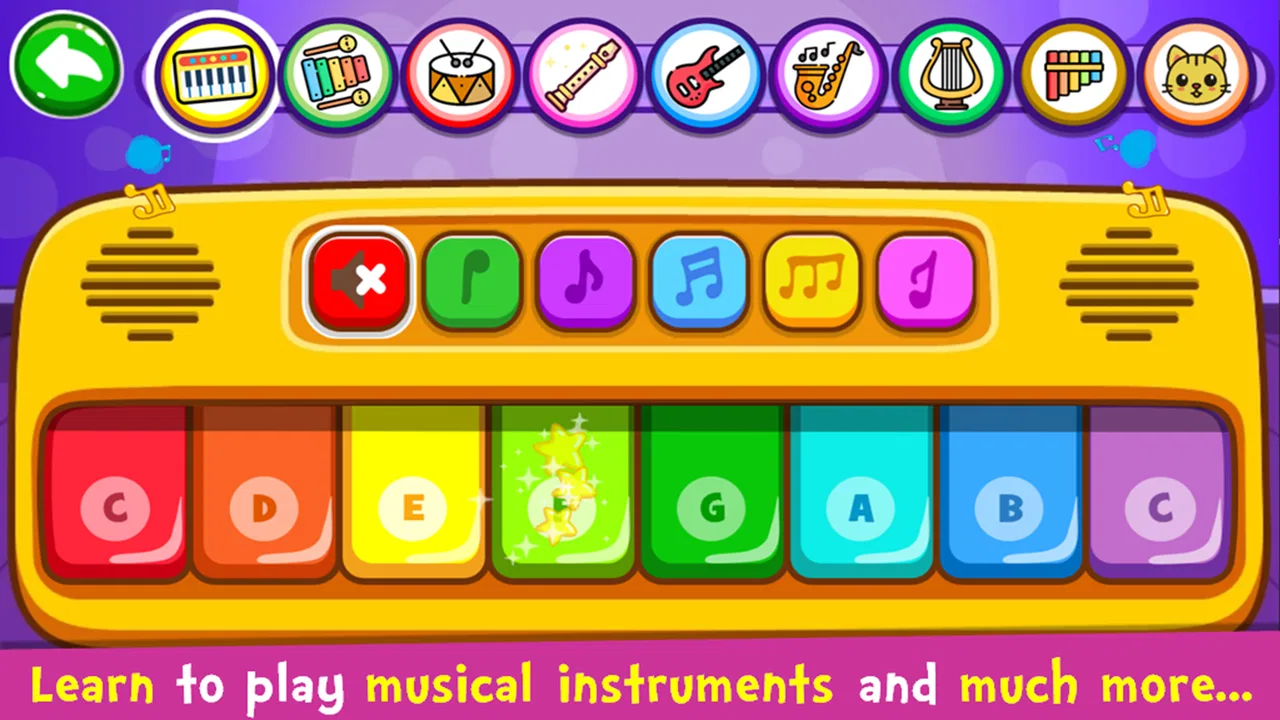
I approached Piano Kids - Music & Songs as a quick musical game rather than a replacement for formal lessons. That distinction matters. The first impression is simple: tap the colorful interface, hear an immediate response, and decide whether to continue. It is designed to make music feel approachable, especially for children who may be more willing to explore a screen than sit in front of a traditional exercise book.
After spending time with it, I found its strongest quality is the tight connection between action and feedback. A tap produces a sound or visible reaction, and that instant response encourages another tap. The game’s appeal comes less from deep musical theory and more from making a child feel involved in creating something. For a free music game from Orange Studios Games, it offers an inviting starting point, although experienced players and serious learners will quickly notice its limits.
The first tap is deliberately easy
The opening experience does not demand that I understand musical notation or know how to hold an instrument. I can begin by touching the on-screen controls and listening to what happens. That low barrier is one of the reasons the game works well for younger users. There is no intimidating lesson plan to decode before the first sound, and the Everyone content rating reflects the broad audience it is intended to serve.
In-Depth Coverage of Piano Kids - Music & Songs
That simplicity also makes it useful in ordinary family situations. If a child is waiting in a quiet place, needs a short distraction during a journey, or wants to show a parent something they have discovered, the game can be picked up without a long explanation. I would still use headphones or keep the volume modest in shared spaces, because the pleasure depends heavily on sound and repeated tapping can become noticeable.
The first action is not about performing a complete song perfectly. It is about discovering that the screen reacts musically. That is an important design choice. A child can experiment without feeling that mistakes are being judged. In my experience, this makes the first minute more welcoming than many educational music tools that begin with instructions, terminology, or a rigid sequence of exercises.
How the feedback keeps the hands moving
The game’s feedback rhythm is built around immediacy. I tap, I hear something, I see a response, and I naturally try another action. This is the basic loop, but it is effective because there is almost no waiting between the input and the result. For a young player, that short gap is enough to turn curiosity into repeated practice.
The sounds are not just decoration. They tell the player that the touch registered and help connect movement with musical output. Even when the player is not consciously learning a scale or rhythm, they are beginning to notice that different touches create different results. I would describe this as informal exploration rather than structured training, but it is still more engaging than simply watching a music video.
Parents should set expectations carefully. The game can encourage interest in instruments, yet tapping an animated interface is not the same as developing finger strength, timing on a real keyboard, or reading music. A child who enjoys it may become curious about piano or other instruments, which is a worthwhile outcome, but the app should sit beside real practice rather than replace it.
One useful way to play is to give the child a small challenge before opening the game: find a certain sound, repeat a short pattern, or create a sequence that a parent can copy. This turns unstructured tapping into a listening activity without making the experience feel like homework. The game supplies the instant response; the adult supplies the conversation that helps the child notice it.
What counts as a reward here
The reward is mainly the pleasure of hearing a result and seeing the game respond. That is a good fit for very young players because it does not require them to understand a complicated scoring system before they can enjoy themselves. The child receives encouragement from the interaction itself, then decides whether to try a different sound or continue with the same one.
I like this approach for short, relaxed sessions. It avoids turning every musical experiment into a test. A child can feel successful simply by producing a sound they like, repeating a familiar pattern, or discovering a new part of the interface. That kind of reward is especially useful for children who become frustrated when an app immediately marks every attempt as right or wrong.
At the same time, the lack of a demanding progression may disappoint older children looking for a clear sense of mastery. If you want graded exercises, detailed performance feedback, or a curriculum that steadily builds technique, a dedicated piano-learning service will be a better choice. Those alternatives usually ask more from the learner, but they also give more precise guidance. This game chooses accessibility over depth.
The free price helps with that first decision. I can let a child try it without committing to a subscription, while optional purchases are listed at $3.99 per item. I would check the purchase settings before handing over a device, particularly if a child is likely to tap through menus independently. The free entry point is attractive, but the presence of optional spending means it is still worth keeping control of the device account.
You May Also Like

 Hill Climb Racing
Why Hill Climb Racing Still Turns Crashes Into One More Run
A tiny car, a bumpy hill and one more upgrade: Hill Climb Racing keeps resurfacing because its simple chaos makes every near-miss feel personal.

 AliExpress - Shopping App
AliExpress Makes Global Shopping Feel Personal, but Shoppers Bear the Risk
AliExpress turns a global marketplace into a pocket-sized discovery engine. Its reach is useful, its shopping loop compelling, and its trade-offs easy to miss.

 Lords Mobile: Kingdom Wars
Lords Mobile Is a Kingdom-Building Routine, Not a Quick Match
A case-by-case verdict on the building, battles, device demands, and social commitments that make Lords Mobile rewarding for some players and exhausting for others.

 PDF Scanner app - TapScanner
TapScanner Makes Paperwork Easier to Capture, Check, and Share
TapScanner makes scanning with a phone feel less like a rescue operation and more like a dependable step in getting work done. Its capture tools are useful, though not flawless.

 Block Blast!
 Shows How Much a Puzzle Game Can Leave Out
A quiet grid game shows why puzzle players increasingly value instant clarity, repeatable skill and low-pressure play—and where the genre still needs to catch up.
 Family Space
 Review: A Shared Routine That Makes Family Life Easier
A parenting app earns its place not by adding more noise, but by making everyday coordination easier. Family Space gets that balance mostly right.
More From Our News Desk
View All News


Why another session begins
The reason to start another session is not usually long-term progression. It is the desire to repeat a satisfying sound, explore a different instrument-like activity, or recreate something that was enjoyable a moment earlier. This makes the game naturally suited to brief bursts. A child can play for a few minutes, stop, and return later without needing to remember a complicated storyline or a difficult level.
That reset is both a strength and a weakness. It keeps the experience approachable because there is little pressure to preserve a perfect run. If a child loses interest, the next attempt feels fresh rather than like a punishment for stopping. But the same light reset can make the game feel shallow for players who expect missions, unlockable systems, or a growing challenge.
In a normal household, I would use it as a transition activity rather than the main entertainment for an entire afternoon. For example, a child could spend a few minutes making sounds before bedtime, during a break from homework, or while waiting for dinner. The short format works best when the goal is to encourage musical curiosity, not to occupy a child indefinitely.
There is also a practical advantage in the absence of a complicated narrative. A younger player can leave and return without asking an adult to explain where they were. That makes it more independent than some story-driven children’s games. However, independence here means easy access to musical play, not a self-guided course with clear educational milestones.
Where it fits among music apps
Compared with a streaming app, this game asks the child to participate instead of simply listening. Compared with a virtual instrument, it gives a more playful context and a more child-friendly invitation to experiment. Compared with serious piano-learning software, it is much less demanding and much less detailed. Each comparison points to the same conclusion: its value is in the first step into music.
I would choose it over a standard music player when I want a child to interact with sound. I would choose it over a full lesson app when the child is not ready for instruction or only wants a quick creative activity. I would not choose it for an adult who wants to improve technique, understand harmony, or follow measurable practice goals. That audience would probably find the loop too light.
The high level of public interest supports the idea that the format is easy to approach: it has an average rating of 4.3 from around 717 thousand ratings and has passed 100 million installs. Those figures do not guarantee that every child will enjoy it, but they do show that the basic concept has reached a very large audience. I would still judge it by the child’s age, patience, and expectations rather than by popularity alone.
The game was released on February 2, 2016, and its current version is 3.65. It runs on Android 6.0 or later, which makes it accessible on many older devices, though the experience will naturally depend on the phone or tablet’s speaker and touch response. A larger screen is preferable for small fingers because it makes targets easier to see and reduces accidental taps near the edges.
Three practical ways to get more from it
My first tip is to turn listening into a call-and-response game. Let the child make a short pattern, then copy it yourself, either on the screen or by clapping. Ask the child whether the two patterns sound the same. This adds memory and attention without pretending that the app is teaching a complete musical method.
My second tip is to use a time boundary before play begins. A short, agreed session keeps the experience pleasant and prevents the repeated feedback from becoming tiring. Because the game is easy to restart, ending does not feel like abandoning a long level. That makes it more suitable for routines than games that punish the player for stopping midway.
My third tip is to treat the sounds as a prompt for conversation. Ask which one feels calm, bright, fast, or surprising, rather than asking only whether the child scored well. This helps the game support vocabulary and listening skills. It also reveals whether the child is genuinely exploring music or merely tapping quickly for visual reactions.
A fourth useful approach is to pair it with a real object when possible. A small keyboard, shaker, or even a table used for gentle rhythm can show the difference between screen feedback and physical sound. The app then becomes an invitation to continue experimenting away from the device. That is where I think its educational value is strongest: it can open the door, even though it does not walk the learner very far down the path.
Friction parents and older players should notice
The biggest limitation is the same feature that makes the game welcoming: the loop is uncomplicated. Once the novelty of tapping and hearing responses fades, some players may want more structure. There is little reason for a skilled musician to return regularly, and older children may outgrow the experience unless they enjoy it as a casual toy.
Sound quality also matters more here than in many visual games. A weak speaker, noisy room, or low volume can reduce the satisfaction of every interaction. If the child cannot clearly hear the result, the action-feedback connection becomes less meaningful. Headphones can help in some situations, but I would supervise their use with younger children and keep listening levels comfortable.
The game is also not ideal for a child who needs a carefully sequenced learning plan. If the goal is to learn named notes, read notation, practise hand position, or receive detailed correction, I would look elsewhere. A teacher or dedicated lesson platform may feel slower and less instantly entertaining, but it will be more appropriate for measurable musical progress.
Adults should also remember that a free game can still include optional purchases. Since each item costs $3.99, I would make sure the child knows which parts are available without spending and keep purchases behind the device’s normal approval process. This is not a reason to reject the game, but it is a sensible part of setting it up for family use.
My verdict on the complete loop
The complete loop is clear: tap an instrument-like control, receive an immediate sound and visual response, enjoy the small reward of making music, reset naturally, and begin again because another sound may be waiting to be discovered. That loop is not deep, but it is coherent. It understands that a young player often needs an inviting first action more than a long explanation.
I recommend it to parents who want a low-pressure musical activity, to children who enjoy experimenting, and to families looking for a quick game that can lead into conversations about sound. I also think it works well as a gentle introduction before a child tries a real keyboard or a more structured lesson.
I would skip it if you are searching for serious practice tools, advanced composition, or a demanding progression system. In those cases, a specialized music-learning app or a real instrument will give you more useful feedback. But for playful exploration, the balance is sensible. Its real strength is making the first musical action feel rewarding enough to repeat.
Orange Studios Games keeps the idea focused, and that focus explains both the broad appeal and the limited depth. As a free game in the music category, it earns its place as a friendly starting point rather than a complete course. For the right player, especially a young beginner, that may be exactly what is needed: a simple reason to listen, tap, smile, and try one more time.
FAQs for Piano Kids - Music & Songs
01What is Piano Kids - Music & Songs, and who is it designed for?
Piano Kids - Music & Songs is a fun and educational app designed to introduce children to the world of music. It offers a variety of musical instruments, songs, and sounds, making it ideal for young kids who are just beginning to explore music. The app is user-friendly and colorful, tailored specifically to engage children and enhance their learning experience.
02What features does Piano Kids - Music & Songs offer?
The app includes a wide range of features such as a virtual piano, xylophone, drums, and flute. It also offers a selection of songs for kids to play along with, sound effects, and musical games that help develop creativity, motor skills, and auditory abilities. The interface is intuitive and designed to be easy for children to navigate.
03Is Piano Kids - Music & Songs safe for children to use?
Yes, Piano Kids - Music & Songs is designed with child safety in mind. It contains no inappropriate content and provides a safe, ad-free environment for children to explore music. Parental controls are available to manage usage time and access, ensuring that your child interacts with the app safely.
04Does Piano Kids - Music & Songs require an internet connection?
Piano Kids - Music & Songs can be used offline, which is great for maintaining entertainment on-the-go without needing an internet connection. However, an internet connection may be required for downloading updates or additional content if available. This makes it versatile for use at home or during travel.
05Are there any in-app purchases in Piano Kids - Music & Songs?
The app offers some free features, but there might be additional content or features available through in-app purchases. These purchases can enhance the experience by providing more songs, instruments, or games. Parents can control these purchases through device settings to ensure that children do not make unauthorized purchases.
Pros
- Engaging interface for young children
- Wide variety of musical instruments
- Educational and fun gameplay
- Bright and colorful graphics
- Offline play available
Cons
- Ads can be distracting
- Limited free content
- Some features require in-app purchases
- No parental control settings
- Occasional app crashes

Piano Kids - Music & Songs
Gallery